
Map Network Drive
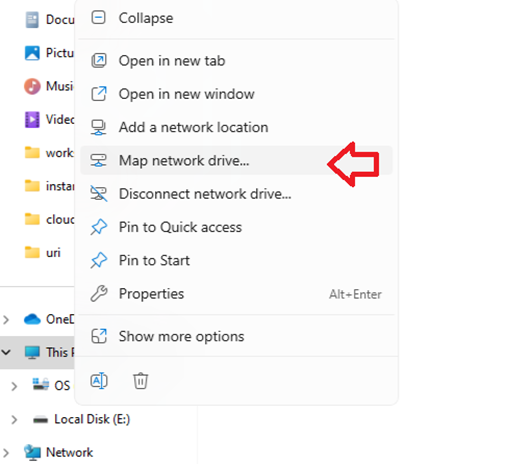
From an Explorer window, right click on This PC and select “Map network drive…”
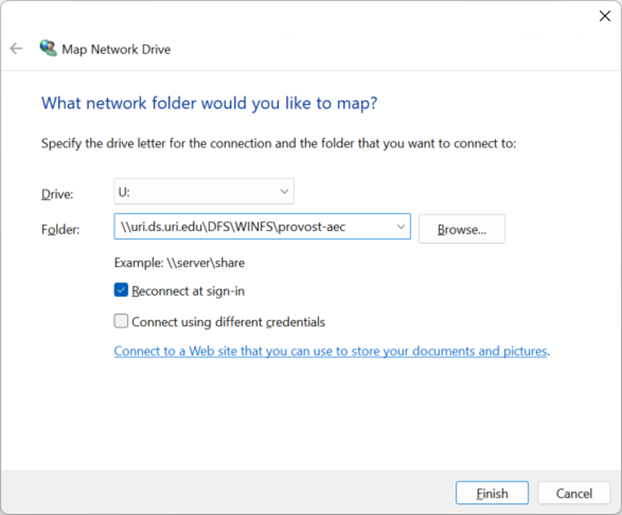
Select your drive (U:\ in this example) and write in the folder you want to connect to (\\uri.ds.uri.edu\DFS\WINFS\provost-aec) (change to your folder where appropriate).
Check “Reconnect at sign-in” only if you’re not using a shared workstation.
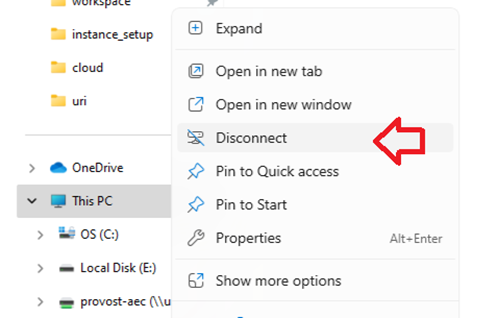
To unmap an existing drive, right click and choose disconnect.
Command line (optional / advanced):
#delete existing connection
net use U: /d
#map (change "user_id" and "***password***")
net use U: "\\uri.ds.uri.edu\DFS\WINFS\provost-aec" /user:URI\user_id ***password*** /PERSISTENT:Y