
Connecting to an Windows file share
Windows
Connect
Have(for yourmost URI SSO ID and password ready.
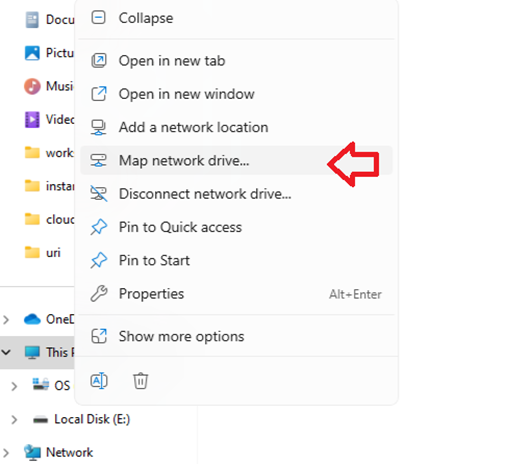
From an Explorer window, right click on This PC and select “Map network drive…”
Selectchoose a drive letter (usually decided by your drivelocal (department). "U:\" in this example)example.
Folder: writeenter the address to the share, usually given by ITS, but is the same for everyone in the foldersame you want to connect to "\\uri.ds.uri.edu\DFS\WINFS\NNNN" (change to your folder where appropriate).unit/dept.
CheckOptionally, check “Reconnect at sign-in” only if you’rethe notmachin you are using ais sharedpersonal workstation.to you, and you want this to be persistent through reboots.
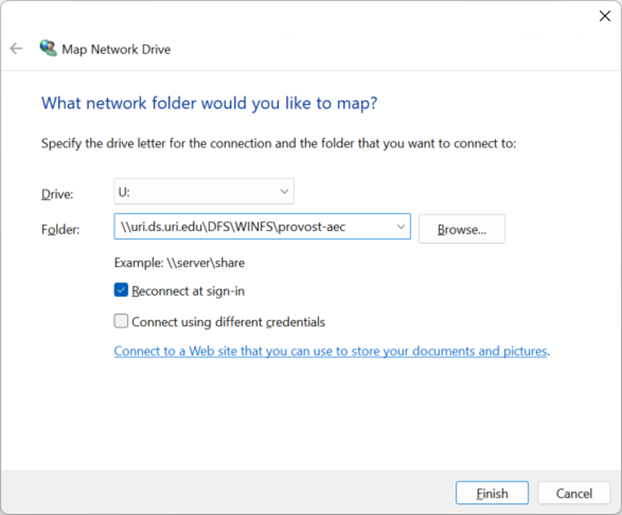
If you need to connect"Connect using different credentials.
Check-- “Remembernot myalways credentials”necessary, onlybut ifthis you’redirection notis usingmore auniversal. shared workstation.
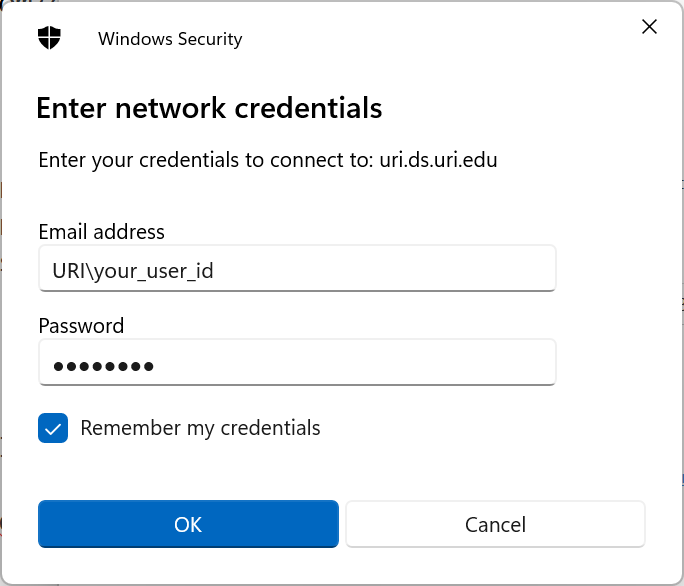
When mapping the drive, youYou want to useget to a prompt like the below, where you can enter your URI ID.credentials. DO NOTPINs, usefingerprints, theetc. pin-- option.none of these will work. Enter your URI credentials like below.
Email address: "URI\jsmith"
Password: your URI single sign-on (SSO) password
Optionally, check remember my credentials if this machine is personal to you.
Connect using command line:
Usually this is used by IT/technical staff as an alternative way to connect.
Disconnect a Drive
(only follow this section if you need to disconnect an existing drive)
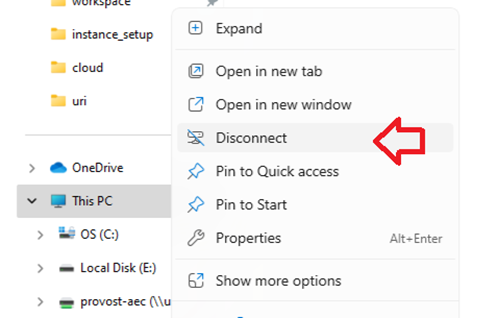
To unmap an existing drive, right click and choose disconnect.
Command Line
(only follow this section to use the command line to map a drive)
(from a powershell or command prompt)
#delete existing connectionU:
net use U: /d
#mapConnect (changeto "your_user_id"a anddrive "***password***" where appropriate)U:
net use U: "\\uri.ds.uri.edu\DFS\WINFS\provost-aec" /user:URI\<your_user_id> ***password***<password> /PERSISTENT:Y
Disconnect
Usually not needed, but useful if you intend to disconnect to some connection that was made in the past.
This PC --> right-click --> Disconnect
Macintosh
To be written